✨ New Arrivals Just Dropped!Explore
PocketWizard AC3 ZoneController for Nikon
HomeStore

PocketWizard AC3 ZoneController for Nikon

PocketWizard AC3 ZoneController for Nikon

PocketWizard AC3 Overview

  • 1Description
  • 2ControlTL
  • 3CLS/i-TTL Compatibility
  • 4Manual Power Control
  • 5ZoneControl
  • 6PowerTracking
  • 7Studio Flash Compatibility
  • 8Simple Design
  • 9Auto-Manual Switch
  • 10Easy to Read Dials

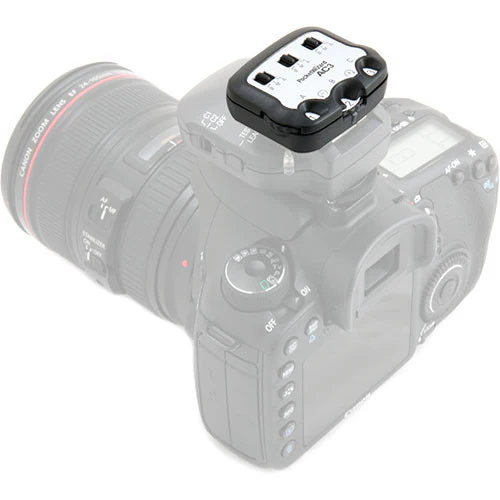
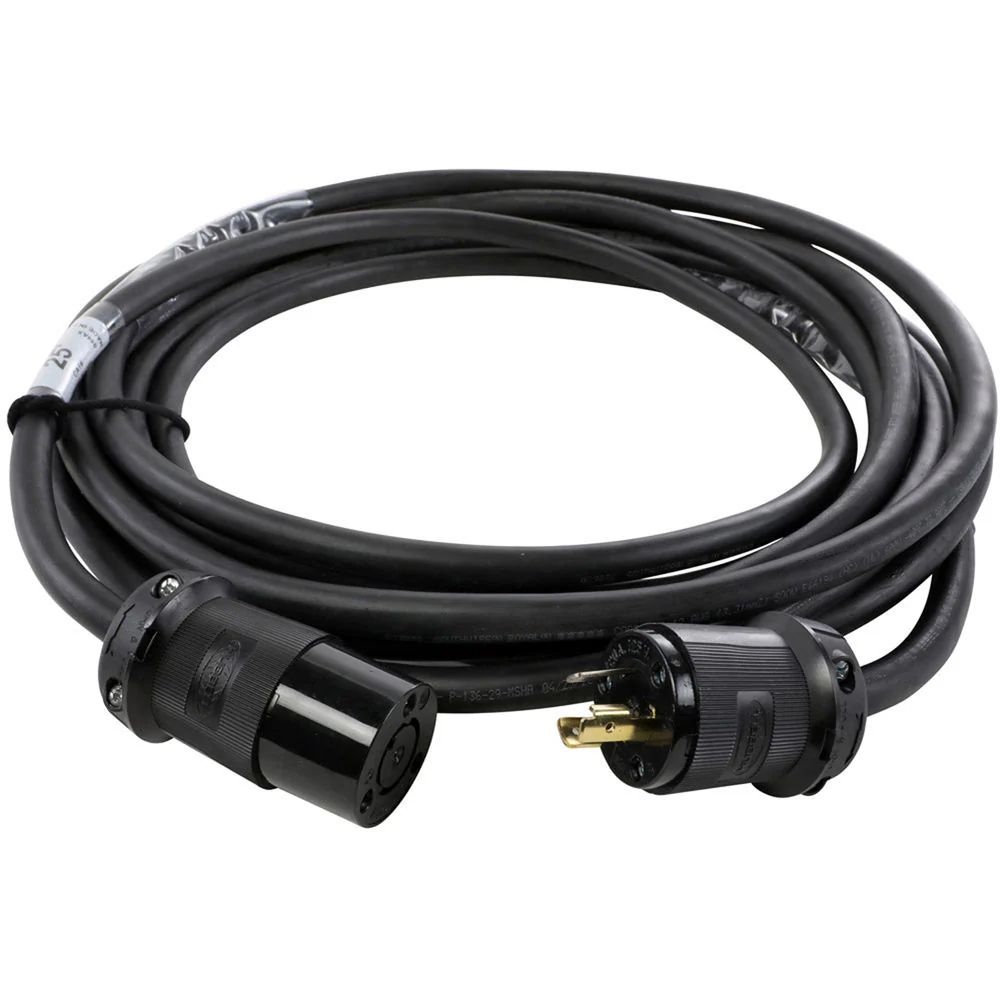
When you add the PocketWizard AC3 ZoneController for Nikon to your on-camera MiniTT1 Transmitter or FlexTT5 Transceiver, you instantly have three zones of flash control. Whether in CLS/i-TTL or Manual mode, you have control over all your flashes from your camera position. Put your flashes wherever you want, without worrying about having to access them during a shoot.

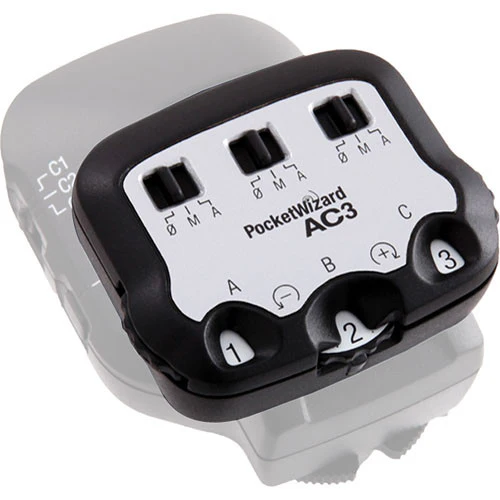
Three clearly labeled dials let you increase or decrease power to three zones of flash in 1/3-stop increments with a range of up to six stops. Three switches allow you to change zones between Manual, Auto (PowerTracking / CLS/i-TTL) or OFF. Best of all, with its intuitive interface, the design is simple to use. When matched with the PowerST4 or AC9 AlienBees Adapter, you can now control Elinchrom RX, White Lightning and AlienBees flashes right from the camera's position.

All the PocketWizard radios in your system should be using the same firmware version for proper functionality. The AC3 for Nikon is compatible with any firmware version used on the MiniTT1 and FlexTT5 for Nikon.

ControlTL
PocketWizard's new firmware platform taps into the full potential of your camera and flash system enabling an entirely new level of remote flash capability through our proven radio communications. ControlTL firmware is configurable and upgradeable for "future-proof" continuous improvement.
CLS/i-TTL Compatibility
Designed to work seamlessly with Nikon's CLS/i-TTL systems, the AC3 ZoneController removes operating complexity with its easy-to-use design.
Manual Power Control
With three simple dials, you can quickly adjust the power settings for three independent zones in 1/3rd stop increments with a six stop range.
ZoneControl
Control up to three zones of light, each with one or more flashes, right from the camera's position. Set them all on manual, auto, or mix the settings between zones. Need to turn a zone off? Just slide a switch and it's off.
PowerTracking
In Auto Mode, change ISO, aperture, or FEC and the lights automatically adjust their compensating power setting with PocketWizard PowerTracking. Set your AC3 ZoneController to manual and PowerTracking is turned off for absolute manual control. PowerTracking can be customized via the PocketWizard Utility.
Studio Flash Compatibility
When used in conjunction with a PowerST4 Receiver for Elinchrom RX, or a FlexTT5 paired with an AC9 AlienBees Adapter, you have remote power control over Elinchrom RX, AlienBees and White Lightning studio flash. You can also mix these Nikon CLS/i-TTL or any other PocketWizard triggered flash.
Simple Design
The AC3 weighs almost nothing and slips into the top-shoe of your on-camera MiniTT1 or FlexTT5. There are three dials and three switches, one for each zone.
Auto-Manual Switch
This switch allows you to set each zone to either Manual Power Control, Auto (PowerTracking CLS/i-TTL) or OFF. Set it to OFF and that zone will not fire.
Easy to Read Dials
Clearly labeled from +3 to -3 in 1/3 stop increments. In Auto mode, the dials act as flash exposure compensation. In manual mode, +3 on the dial is your flashes maximum power level. Adjust the dial down to control your power in 1/3 stop increments for up to six stops of control.
UPC: 893577001743

In the Box

  • PocketWizard AC3 ZoneController for Nikon
  • Quick Guide
  • Limited 1-Year Manufacturer Warranty
    Table of Contents
    • Description
    • ControlTL
    • CLS/i-TTL Compatibility
    • Manual Power Control
    • ZoneControl
    • PowerTracking
    • Studio Flash Compatibility
    • Simple Design
    • Auto-Manual Switch
    • Easy to Read Dials

    PocketWizard AC3 Specs

    Compatibility
    Nikon CLS/i-TTL, Elinchrom RX, AlienBees, White Lightning
    Mounting
    Hot shoe
    Adjustments
    Auto = +/- 3 stops, 1/3 stop increments
    Selector switch: Off, Manual, Auto (PowerTracking, CLS/i-TTL)
    Status Indicator
    LED: Green status indicator
    Operating Temperature
    Above 5°F (-15°C) and below 120°F (50°C)
    Storage Temperature
    Above -22°F (-30°C) and below 185°F (85°C)
    Power
    Receives power from MiniTT1 Transmitter or FlexTT5 Pocket Wizard
    Dimensions
    2 x 1.7 x 0.9" (5 x 4.2 x 2.1 cm)
    Weight
    0.82 oz (23.25g)
    Requirements
    MiniTT1 Transmitter or FlexTT5 Transceiver with firmware version 2.100
    Packaging Info
    Package Weight
    0.09 lb
    Box Dimensions (LxWxH)
    4.4 x 4.3 x 1.8"

    All product and company names are trademarks™ or registered® trademarks of their respective holders. Use of them does not imply any affiliation with or endorsement by them.
    $36.07

    Original: $120.25

    -70%
    PocketWizard AC3 ZoneController for Nikon

    $120.25

    $36.07

    More Images

    PocketWizard AC3 ZoneController for Nikon - Image 2
    PocketWizard AC3 ZoneController for Nikon - Image 3

    PocketWizard AC3 ZoneController for Nikon

    PocketWizard AC3 Overview

    • 1Description
    • 2ControlTL
    • 3CLS/i-TTL Compatibility
    • 4Manual Power Control
    • 5ZoneControl
    • 6PowerTracking
    • 7Studio Flash Compatibility
    • 8Simple Design
    • 9Auto-Manual Switch
    • 10Easy to Read Dials

    When you add the PocketWizard AC3 ZoneController for Nikon to your on-camera MiniTT1 Transmitter or FlexTT5 Transceiver, you instantly have three zones of flash control. Whether in CLS/i-TTL or Manual mode, you have control over all your flashes from your camera position. Put your flashes wherever you want, without worrying about having to access them during a shoot.

    Three clearly labeled dials let you increase or decrease power to three zones of flash in 1/3-stop increments with a range of up to six stops. Three switches allow you to change zones between Manual, Auto (PowerTracking / CLS/i-TTL) or OFF. Best of all, with its intuitive interface, the design is simple to use. When matched with the PowerST4 or AC9 AlienBees Adapter, you can now control Elinchrom RX, White Lightning and AlienBees flashes right from the camera's position.

    All the PocketWizard radios in your system should be using the same firmware version for proper functionality. The AC3 for Nikon is compatible with any firmware version used on the MiniTT1 and FlexTT5 for Nikon.

    ControlTL
    PocketWizard's new firmware platform taps into the full potential of your camera and flash system enabling an entirely new level of remote flash capability through our proven radio communications. ControlTL firmware is configurable and upgradeable for "future-proof" continuous improvement.
    CLS/i-TTL Compatibility
    Designed to work seamlessly with Nikon's CLS/i-TTL systems, the AC3 ZoneController removes operating complexity with its easy-to-use design.
    Manual Power Control
    With three simple dials, you can quickly adjust the power settings for three independent zones in 1/3rd stop increments with a six stop range.
    ZoneControl
    Control up to three zones of light, each with one or more flashes, right from the camera's position. Set them all on manual, auto, or mix the settings between zones. Need to turn a zone off? Just slide a switch and it's off.
    PowerTracking
    In Auto Mode, change ISO, aperture, or FEC and the lights automatically adjust their compensating power setting with PocketWizard PowerTracking. Set your AC3 ZoneController to manual and PowerTracking is turned off for absolute manual control. PowerTracking can be customized via the PocketWizard Utility.
    Studio Flash Compatibility
    When used in conjunction with a PowerST4 Receiver for Elinchrom RX, or a FlexTT5 paired with an AC9 AlienBees Adapter, you have remote power control over Elinchrom RX, AlienBees and White Lightning studio flash. You can also mix these Nikon CLS/i-TTL or any other PocketWizard triggered flash.
    Simple Design
    The AC3 weighs almost nothing and slips into the top-shoe of your on-camera MiniTT1 or FlexTT5. There are three dials and three switches, one for each zone.
    Auto-Manual Switch
    This switch allows you to set each zone to either Manual Power Control, Auto (PowerTracking CLS/i-TTL) or OFF. Set it to OFF and that zone will not fire.
    Easy to Read Dials
    Clearly labeled from +3 to -3 in 1/3 stop increments. In Auto mode, the dials act as flash exposure compensation. In manual mode, +3 on the dial is your flashes maximum power level. Adjust the dial down to control your power in 1/3 stop increments for up to six stops of control.
    UPC: 893577001743

    In the Box

    • PocketWizard AC3 ZoneController for Nikon
    • Quick Guide
    • Limited 1-Year Manufacturer Warranty
      Table of Contents
      • Description
      • ControlTL
      • CLS/i-TTL Compatibility
      • Manual Power Control
      • ZoneControl
      • PowerTracking
      • Studio Flash Compatibility
      • Simple Design
      • Auto-Manual Switch
      • Easy to Read Dials

      PocketWizard AC3 Specs

      Compatibility
      Nikon CLS/i-TTL, Elinchrom RX, AlienBees, White Lightning
      Mounting
      Hot shoe
      Adjustments
      Auto = +/- 3 stops, 1/3 stop increments
      Selector switch: Off, Manual, Auto (PowerTracking, CLS/i-TTL)
      Status Indicator
      LED: Green status indicator
      Operating Temperature
      Above 5°F (-15°C) and below 120°F (50°C)
      Storage Temperature
      Above -22°F (-30°C) and below 185°F (85°C)
      Power
      Receives power from MiniTT1 Transmitter or FlexTT5 Pocket Wizard
      Dimensions
      2 x 1.7 x 0.9" (5 x 4.2 x 2.1 cm)
      Weight
      0.82 oz (23.25g)
      Requirements
      MiniTT1 Transmitter or FlexTT5 Transceiver with firmware version 2.100
      Packaging Info
      Package Weight
      0.09 lb
      Box Dimensions (LxWxH)
      4.4 x 4.3 x 1.8"

      All product and company names are trademarks™ or registered® trademarks of their respective holders. Use of them does not imply any affiliation with or endorsement by them.

      Product Information

      Shipping & Returns

      Description

      PocketWizard AC3 Overview

      • 1Description
      • 2ControlTL
      • 3CLS/i-TTL Compatibility
      • 4Manual Power Control
      • 5ZoneControl
      • 6PowerTracking
      • 7Studio Flash Compatibility
      • 8Simple Design
      • 9Auto-Manual Switch
      • 10Easy to Read Dials

      When you add the PocketWizard AC3 ZoneController for Nikon to your on-camera MiniTT1 Transmitter or FlexTT5 Transceiver, you instantly have three zones of flash control. Whether in CLS/i-TTL or Manual mode, you have control over all your flashes from your camera position. Put your flashes wherever you want, without worrying about having to access them during a shoot.

      Three clearly labeled dials let you increase or decrease power to three zones of flash in 1/3-stop increments with a range of up to six stops. Three switches allow you to change zones between Manual, Auto (PowerTracking / CLS/i-TTL) or OFF. Best of all, with its intuitive interface, the design is simple to use. When matched with the PowerST4 or AC9 AlienBees Adapter, you can now control Elinchrom RX, White Lightning and AlienBees flashes right from the camera's position.

      All the PocketWizard radios in your system should be using the same firmware version for proper functionality. The AC3 for Nikon is compatible with any firmware version used on the MiniTT1 and FlexTT5 for Nikon.

      ControlTL
      PocketWizard's new firmware platform taps into the full potential of your camera and flash system enabling an entirely new level of remote flash capability through our proven radio communications. ControlTL firmware is configurable and upgradeable for "future-proof" continuous improvement.
      CLS/i-TTL Compatibility
      Designed to work seamlessly with Nikon's CLS/i-TTL systems, the AC3 ZoneController removes operating complexity with its easy-to-use design.
      Manual Power Control
      With three simple dials, you can quickly adjust the power settings for three independent zones in 1/3rd stop increments with a six stop range.
      ZoneControl
      Control up to three zones of light, each with one or more flashes, right from the camera's position. Set them all on manual, auto, or mix the settings between zones. Need to turn a zone off? Just slide a switch and it's off.
      PowerTracking
      In Auto Mode, change ISO, aperture, or FEC and the lights automatically adjust their compensating power setting with PocketWizard PowerTracking. Set your AC3 ZoneController to manual and PowerTracking is turned off for absolute manual control. PowerTracking can be customized via the PocketWizard Utility.
      Studio Flash Compatibility
      When used in conjunction with a PowerST4 Receiver for Elinchrom RX, or a FlexTT5 paired with an AC9 AlienBees Adapter, you have remote power control over Elinchrom RX, AlienBees and White Lightning studio flash. You can also mix these Nikon CLS/i-TTL or any other PocketWizard triggered flash.
      Simple Design
      The AC3 weighs almost nothing and slips into the top-shoe of your on-camera MiniTT1 or FlexTT5. There are three dials and three switches, one for each zone.
      Auto-Manual Switch
      This switch allows you to set each zone to either Manual Power Control, Auto (PowerTracking CLS/i-TTL) or OFF. Set it to OFF and that zone will not fire.
      Easy to Read Dials
      Clearly labeled from +3 to -3 in 1/3 stop increments. In Auto mode, the dials act as flash exposure compensation. In manual mode, +3 on the dial is your flashes maximum power level. Adjust the dial down to control your power in 1/3 stop increments for up to six stops of control.
      UPC: 893577001743

      In the Box

      • PocketWizard AC3 ZoneController for Nikon
      • Quick Guide
      • Limited 1-Year Manufacturer Warranty
        Table of Contents
        • Description
        • ControlTL
        • CLS/i-TTL Compatibility
        • Manual Power Control
        • ZoneControl
        • PowerTracking
        • Studio Flash Compatibility
        • Simple Design
        • Auto-Manual Switch
        • Easy to Read Dials

        PocketWizard AC3 Specs

        Compatibility
        Nikon CLS/i-TTL, Elinchrom RX, AlienBees, White Lightning
        Mounting
        Hot shoe
        Adjustments
        Auto = +/- 3 stops, 1/3 stop increments
        Selector switch: Off, Manual, Auto (PowerTracking, CLS/i-TTL)
        Status Indicator
        LED: Green status indicator
        Operating Temperature
        Above 5°F (-15°C) and below 120°F (50°C)
        Storage Temperature
        Above -22°F (-30°C) and below 185°F (85°C)
        Power
        Receives power from MiniTT1 Transmitter or FlexTT5 Pocket Wizard
        Dimensions
        2 x 1.7 x 0.9" (5 x 4.2 x 2.1 cm)
        Weight
        0.82 oz (23.25g)
        Requirements
        MiniTT1 Transmitter or FlexTT5 Transceiver with firmware version 2.100
        Packaging Info
        Package Weight
        0.09 lb
        Box Dimensions (LxWxH)
        4.4 x 4.3 x 1.8"

        All product and company names are trademarks™ or registered® trademarks of their respective holders. Use of them does not imply any affiliation with or endorsement by them.

        PocketWizard AC3 ZoneController for Nikon | Tanotis